Path
Contents
Short answer: Most budgets run on the calendar month, but money arrives on payday. Tracking from one payday to the next makes “how much is left?” easier to answer.
30-second summary (as of Nov 3, 2026)
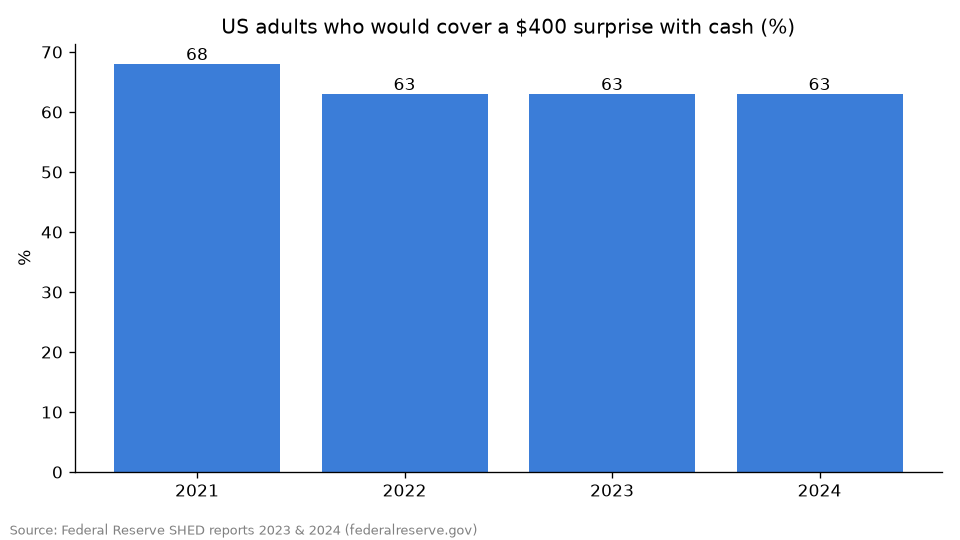
- 63% of US adults said they would cover a surprise $400 expense with cash or its equivalent in 2023 — down from 68% in 2021 [Source: Federal Reserve, SHED 2023]
- That share stayed unchanged in 2024 [Source: Federal Reserve, SHED 2024]
- 21% of adults experienced financial fraud or scams in 2024 [Source: same SHED 2024 summary]
- No budget can promise savings. A budget only shows you where money goes.
📌 Disclosure: this post has 1 link to a product we sell (botkora). This is a summary of public data, not personal experience.
1. Why a $400 surprise is a good test
The Federal Reserve asks every year whether people could pay an unexpected $400 bill with cash. The answer has been stuck at 63% since 2022.
If you can’t tell how much is left before the next payday, a $400 bill is hard to plan for. That’s the gap a simple budget tries to close.
2. Calendar month vs. payday period
- Calendar month: rent on the 1st, pay on the 25th — the month looks “broke” for a week even when it isn’t.
- Payday period: from the 25th to the next 24th. Income and bills land in the same window, so “money left” means something.
Want to grow what’s left? Read our guide to high-yield savings accounts.
3. A 4-step setup you can do tonight
- Write your payday (e.g., the 25th).
- List fixed bills first (rent, phone, insurance).
- Split the rest into living, saving, and an emergency pot — by % or by amount.
- Log each spend with date, category, and amount. Check “money left” once a week.
4. A ready-made file, if you’d rather not build one
📒 2027 Auto Budget (Excel + Google Sheets, payday-based)
See your money from one payday to the next. Type the date, category and amount. Money left and charts show up by themselves.
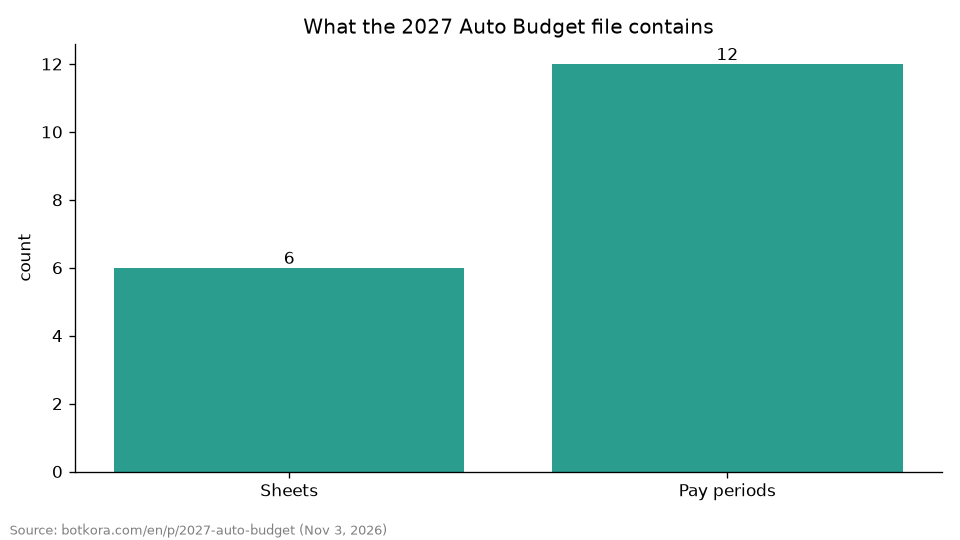
- Enter your payday, get 12 periods
- Split money into accounts (% or amount)
- 2,000 rows for spending, dashboard and category summaries
- Excel (PC/Mac) and Google Sheets · No macros · Free sample file (January period)
- Note: the file is in Korean.
$7.30, shown at $5.11 on Nov 3, 2026 (final price at checkout) · No savings result is promised. Not financial advice.
👉 See details
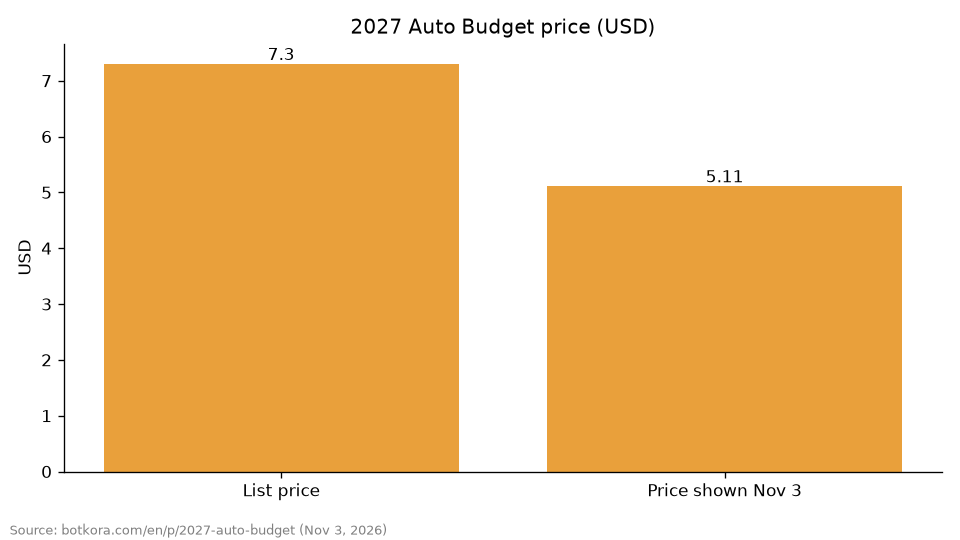
Prices from the product page on Nov 3, 2026; they may change.
5. Where budgets usually fail
- Logging stops after week 2. Fix: log once a day, not after every purchase.
- Too many categories. Start with 6–8.
- No emergency pot. The $400 test above is exactly this.
- Scam losses. 21% of adults hit fraud or scams in 2024 [SHED 2024] — check unknown charges every week.
6. FAQ
Does it work outside Korea? The math works anywhere, but the file text is Korean.
Do I need Excel? No, Google Sheets works too.
Will it save me money? No tool can promise that. It shows where money goes.
Read next
Sources
- Federal Reserve, Economic Well-Being of U.S. Households in 2023 — https://www.federalreserve.gov/publications/2024-economic-well-being-of-us-households-in-2023-executive-summary.htm
- Federal Reserve, Economic Well-Being of U.S. Households in 2024 — https://www.federalreserve.gov/publications/2025-economic-well-being-of-us-households-in-2024-executive-summary.htm
- Product page (contents, price) — https://botkora.com/en/p/2027-auto-budget/
🎁 Free: 7-day starter checklist for earning extra income
Leave your email and get the free checklist now. No spam, unsubscribe anytime.
Popular guides
- Top 10 Ways to Make Money Starting This Week (Free Checklist)
- Passive Income Ideas: Realistic Options for 2026
- Make Money Online Without Investment: 20 Free Ways
- How to Make Money with AI: 50 Practical Ways (2026)
- How to Make Money From Home: 20 Legit Ways
- Make Money Online for Beginners: 15 Easy Ways to Start
- 16 Legit Ways to Make Money Fast (This Week)
- How to Make Money as a Teenager: 16 Safe Ideas
- 14 Remote Jobs With No Experience Needed
Next method: Budget by Payday, Not by Calendar: A Simple Paycheck-to-Paycheck Method (3 Real Cases) →