Naver Smart Store fees 2026 at a glance (스마트스토어 판매수수료). Since payments on 2 June 2025, every Smart Store order pays one sales fee of 2.73% (3% with VAT), or 0.91% (1% with VAT) for buyers you brought in through your own marketing. The Npay order-management fee is charged on top, at a rate set by your sales grade. This guide explains both fees from Naver’s official help pages, shows how to calculate them, and covers how consignment selling (위탁판매) works on Smart Store.
What are the Naver Smart Store fees in 2026?
Sales fee (판매수수료): one of four types per order
| Fee type | Listed rate (excl. VAT) | Rate charged at settlement (incl. VAT) |
|---|---|---|
| Smart Store sales fee | 2.73% | 3% |
| Smart Store seller-marketing fee | 0.91% | 1% |
| Brand Store sales fee | 3.64% | 4% |
| Brand Store seller-marketing fee | 1.82% | 2% |
Npay order-management fee (주문관리 수수료) by sales grade
| Grade | Rate (incl. VAT) |
|---|---|
| 영세 (small) | 1.947% |
| 중소1 | 2.563% |
| 중소2 | 2.728% |
| 중소3 | 3.003% |
| 일반 (general) | 3.630% |
Source: Naver Smart Store and Npay help pages (links below). Grades follow the sales grade reported to the National Tax Service, and Naver applied these lower Npay rates from 1 October 2025.
Why does Naver show 2.73% but charge 3%?
Naver lists rates without VAT and rounds them up at the third decimal place. Settlement uses the VAT-inclusive rate. So 2.73% is the listed figure (2.727% actual), and 3% is what is deducted. The same applies to 0.91% → 1%.
When does the 1% seller-marketing fee apply?
When a buyer arrives through your own advertising or promotion, inside or outside Naver. Naver’s own examples: a sale from a Naver shopping search ad, or from a marketing link in your brand’s social media, is charged 1%. A sale from price-comparison search or from exposure in the Naver Plus Store app is charged 3%.
How do I calculate the total Smart Store fee? (example)
Example (illustrative numbers): a ₩100,000 order from price-comparison search, seller in the 일반 grade.
- Sales fee: ₩100,000 × 3% = ₩3,000
- Npay order-management fee: ₩100,000 × 3.630% = ₩3,630
- Total: ₩6,630 (6.63%)
The same order from your own search ad, in the 영세 grade: ₩1,000 + ₩1,947 = ₩2,947 (2.947%). Shopping Live, 원쁠딜 and rental products can add separate fees; check the official fee page.
Where to see your own grade: Smart Store Center → 정산관리 → 정산내역 (after login).
What is consignment selling (위탁판매) on Smart Store?
Consignment selling is Korea’s version of dropshipping. You list products from a domestic wholesale platform such as Domeggook/Domeme or OwnerClan in your Smart Store. When a customer orders, you pass the order and address to the supplier, who ships directly. You do not buy stock in advance; you keep the gap between your price and the wholesale price, minus the fees above.
Who is it for?
- People in Korea who like keyword research and spreadsheets
- Sellers who can answer customer questions within hours
- Anyone who wants to test products before holding stock
What are the downsides?
- Many stores list the same wholesale items, so prices are competitive
- You are the seller of record: late or wrong shipments from the supplier become your problem
- Margins are thin after both Naver fees, coupons and returns
- KC certification, trademark and health-claim rules can get listings removed
What paperwork do I need in Korea?
- Repeated selling is a business: register at Hometax (사업자등록) and file 통신판매업 신고 on Government24 unless an exemption applies. Check current rules on those official sites.
- Electronics, children’s products and some household goods need KC certification; check the supplier’s certificate number on Safety Korea before listing.
- Never use a brand name you do not own in titles or images.
Official sources: Smart Store fee FAQ (판매수수료) · Npay order fee by grade (주문관리 수수료) · Smart Store Center · Government24 통신판매업 신고 · Hometax 사업자등록 · Safety Korea (KC 인증)
🧭 Is this for you?
Consignment selling (위탁판매) on Naver Smart Store means listing products from a wholesale supplier in your own store; when an order comes in, you pass it to the supplier, who ships directly to the buyer. You never hold stock. Because the fees are low (see the tables below) and anyone can open a store, competition is fierce, so profit comes from choosing the right products, writing better listings and handling orders reliably, not from uploading thousands of items.
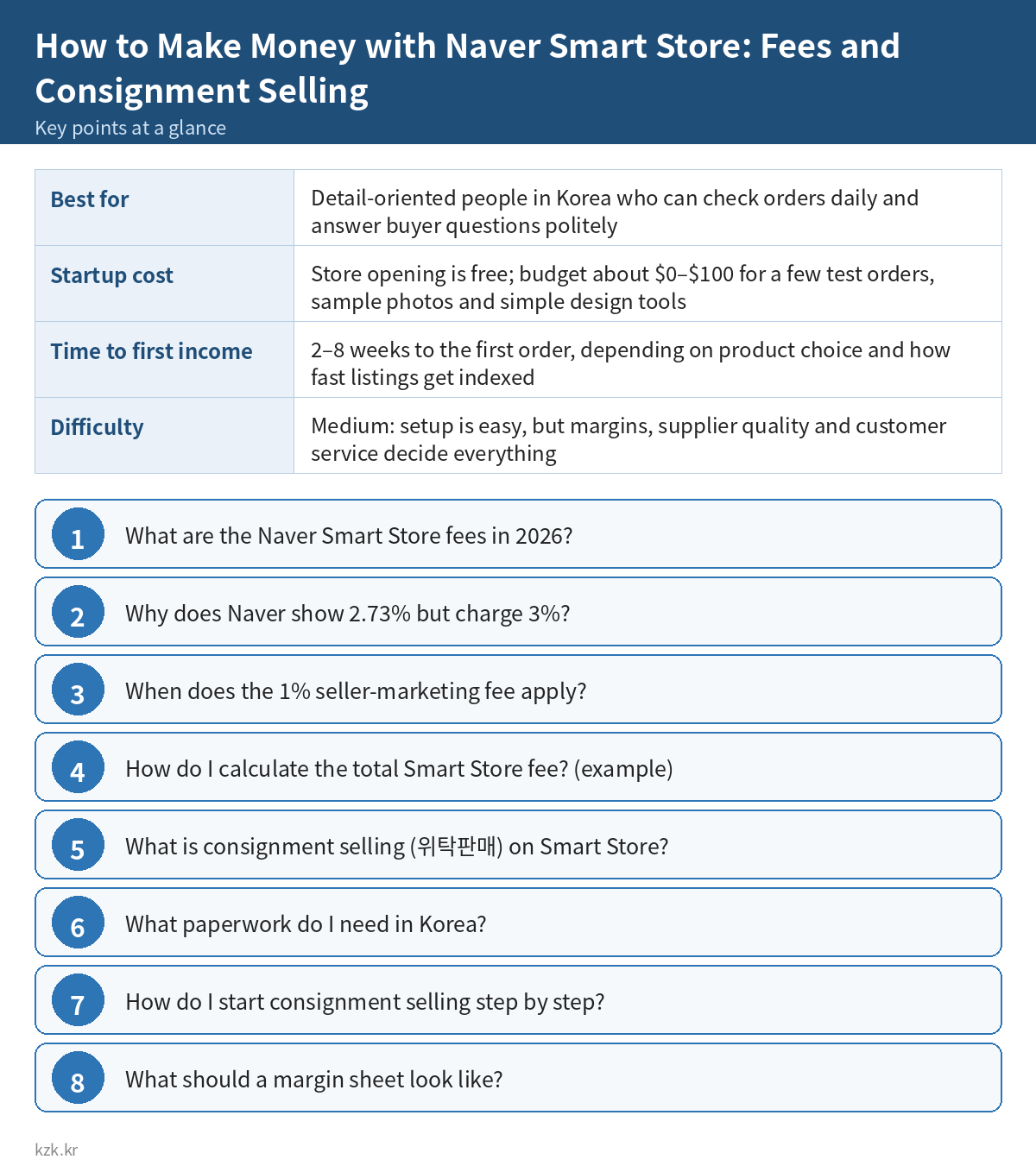
- Best for: Detail-oriented people in Korea who can check orders daily and answer buyer questions politely
- Startup cost: Store opening is free; budget about $0–$100 for a few test orders, sample photos and simple design tools
- Time to first income: 2–8 weeks to the first order, depending on product choice and how fast listings get indexed
- Difficulty: Medium: setup is easy, but margins, supplier quality and customer service decide everything
👍 Why it works
- No inventory or warehouse: the supplier ships
- Low sales fees compared with many marketplaces
- Skills (product research, listings, ads) carry over to your own brand later
👎 Watch out for
- Thin margins: many sellers list the same items at the same price
- You are responsible to the buyer for supplier mistakes, delays and stock-outs
- Naver’s search ranking rewards sales history, reviews and good listings, so new stores start slowly
📘 What this guide covers: a 6-step consignment workflow, how to pick products with real demand and room for margin, a margin calculator with Smart Store fees, a supplier-vetting checklist, realistic USD income ranges, 7 tools with links, a first-week plan and the mistakes that get new stores penalised. Get the Guide PDF ($4.99) →
The steps below are free. Want every method compared side by side with a first-week plan?
See full guide →How do I start consignment selling step by step?
- Set up the store. Open Smart Store Center as an individual or business seller, connect a bank account in your name, and write clear shipping, return and exchange policies.
- Choose a supplier. Use one or two consignment platforms. Read their rules on image use, shipping cut-off times and returns, and place one sample order yourself.
- Pick keywords, not products. In Naver DataLab Shopping Insight and the Search Ad keyword tool, look for specific 2–4 word searches where the first page has few strong listings.
- Vet every item. Check KC certification, avoid brand names you do not own and health claims, and confirm the supplier has stock.
- Write the listing for the search. Use the exact keyword naturally in the title, make your own thumbnail, and rewrite the detail page: size, material, who it is for, what is in the box, shipping time.
- Price with both fees. Selling price − wholesale cost − sales fee (3% or 1%) − Npay fee (your grade) − coupon − returns allowance.
- Operate daily, review weekly. Forward orders and enter tracking the same day, answer Q&A quickly, and remove listings that get no clicks.
What should a margin sheet look like?
Product | Keyword | Wholesale cost | Shipping charged | Selling price | Sales fee (3% / 1%) | Npay fee (my grade %) | Coupon | Return allowance | Net margin | Keep?
Net margin = Selling price - Wholesale - Selling price*(Sales fee + Npay fee) - Coupon - Return allowance
Example (illustrative numbers): ₩24,000 sale, ₩17,000 wholesale, 3% sales fee and 3.630% Npay fee (₩1,591) → ₩5,409 before coupons and returns.
How should I reply to a delivery delay?
Hello, thank you for your order. The item ships directly from our partner warehouse and is expected to leave on {date}. We're sorry for the wait. If you would rather not wait, reply here and we will cancel and refund in full right away.
Which tools help?
- Smart Store Center — open and manage your store, see your fee grade
- 도매꾹 / 도매매 — Korean wholesale and consignment marketplace
- 오너클랜 (OwnerClan) — consignment supplier platform
- Naver DataLab 쇼핑인사이트 — search-trend data by category
- Naver Search Ad keyword tool — monthly search volume per keyword
- Safety Korea (KC search) — check KC certificate numbers
What are the common mistakes?
- Pricing with only the 3% sales fee and forgetting the Npay fee.
- Copying the supplier’s title and photos, identical to many other stores.
- Listing electronics or children’s items without checking KC.
- Using brand names or celebrity images you have no right to use.
- Running ads before any organic sale.
FAQ: Naver Smart Store fees
Is the Smart Store sales fee 2.73% or 3%?
Both describe the same fee. 2.73% is the listed rate without VAT; 3% is the VAT-inclusive rate deducted at settlement.
Is the Npay fee included in the 3%?
No. The Npay order-management fee (1.947%–3.630% by grade, VAT included) is charged in addition to the sales fee.
Which buyers count for the 1% fee?
Buyers who arrive through your own advertising or promotion, such as a Naver shopping search ad or a marketing link in your brand’s social media.
Where do I check my fee grade?
In Smart Store Center under 정산관리 → 정산내역 (after login). Grades follow the sales grade reported to the National Tax Service.
Is consignment selling on Smart Store legal?
Yes, selling products shipped by a domestic supplier is a normal retail model. You are still the seller, so refund, delivery and labelling rules apply to you.
Related guides
- Dropshipping
- Amazon & Etsy Listing Optimization Service
- Side Hustle Taxes: The Basics Every Freelancer Should Know
Fees from Naver’s official help pages, checked October 2026. Platforms change fees; check the official pages before you price. Example numbers are for illustration only, not a promise of results.
Read next
- Coupang Partners sign-up, commission and payouts guide
- Free tools for product listing images
- How to price used items
The full guide is free here. Want it as a printable PDF? Get the Guide PDF ($4.99).
📘 Full playbook (updated October 2026)
🪜 Step-by-step system
- Set up the legal basics. You can open a Smart Store as an individual, but regular selling generally needs a business registration (사업자등록 on Hometax) and an online-sales report (통신판매업 신고 on Gov24); check the current exemptions and thresholds before you scale. Keep records for VAT and income tax from the first order.
- Research demand before suppliers. Use Naver DataLab Shopping Insight and Itemscout to find categories with steady searches and few strong listings. Look for specific needs (a size, use case or season) rather than broad items like ‘phone case’.
- Choose reliable suppliers. Wholesale platforms such as Domeggook and Ownerclan offer consignment-friendly products. Before listing, order a sample, check delivery speed, packaging, stock levels, return rules and whether the supplier allows resale on Smart Store and use of its images.
- Price with the full cost in mind. Selling price must cover wholesale cost, shipping, the Smart Store sales fee, the Npay order-management fee, returns and your time. If the margin after fees is under about 10–15%, skip the product or add value with a bundle.
- Write listings that convert. Use a clear product name with the key search terms, original thumbnails where possible, and a detail page that answers size, material, use and delivery questions. Don’t copy another seller’s photos or text, and follow Naver’s rules on names and keyword stuffing.
- Run orders like a shop owner. Check orders at least twice a day, forward them to the supplier, enter tracking numbers on time and reply to questions quickly. Delays and cancellations hurt your store grade, so remove products the moment a supplier runs out of stock.
📖 Real-world example
Ji-hoon picks home-camping accessories after seeing steady searches for compact folding tables and lantern hooks. He finds three suppliers on wholesale sites, orders samples and lists 25 carefully written products instead of 500 copied ones. In his second month he gets about 40 orders with an average price of ₩28,000; after wholesale cost, shipping and fees he keeps roughly 15%, about ₩170,000 (around $120). It’s small, but reviews start to accumulate and his best two products begin ranking higher.
Illustrative scenario built from typical public rates; your results will vary.
✍️ Copy-paste templates
Margin calculator (per order)
Selling price: ₩______
− Wholesale cost: ₩______
− Shipping (if not included): ₩______
− Smart Store sales fee (3% incl. VAT, or 1% for your own marketing traffic): ₩______
− Npay order-management fee (by sales grade): ₩______
− Return/refund allowance (about 3–5%): ₩______
= Profit: ₩______  (margin under 10–15%? skip or bundle)
Supplier checklist
[ ] Sample ordered and quality checked
[ ] Ships within 1–2 days, tracking provided
[ ] Stock level and restock updates available
[ ] Return and exchange process written down
[ ] Resale on Smart Store and image use allowed
[ ] Product certification (KC etc.) where required
💵 What to charge (USD estimates)
- Typical margin after fees on consignment items: about 5–25% per order
- New store, first 3 months: often $0–$150 a month in profit
- Store with 20–50 well-chosen products and steady reviews: about $200–$1,500 a month
- Higher income usually comes after moving the best sellers to your own stock or branded products
Estimates only, not a guarantee. Rates vary by country, skill, niche and hours.
🔗 Tools with links
- Naver Smart Store Center — open your store, register products and manage orders and settlements
- Domeggook (도매꾹) — large Korean wholesale platform with consignment options
- Ownerclan (오너클랜) — Korean wholesale platform built for online consignment sellers
- Naver DataLab Shopping Insight — free tool showing search trends by shopping category, age and season
- Itemscout (아이템스카우트) — keyword and competition research for Naver shopping
- Hometax (홈택스) — register your business and file VAT and income tax
- Gov24 (정부24) — file your online-sales business report and other civil documents
📅 Your first week, day by day
- Day 1: Open your Smart Store and read the seller rules.
- Day 2: Check business registration and online-sales report requirements for your situation.
- Day 3: Research 3 categories with DataLab and Itemscout and shortlist 20 products.
- Day 4: Contact suppliers and order 2–3 samples.
- Day 5: Run each product through the margin calculator and drop weak ones.
- Day 6: Write and publish 5 strong listings with clear names and details.
- Day 7: Set up an order-check routine and note questions buyers might ask.
🚫 Common mistakes (and what to do instead)
- Uploading hundreds of copied listings; low-quality duplicates rarely sell and can be penalised.
- Forgetting fees and returns, so a sale loses money.
- Not checking supplier stock, then cancelling orders and losing store grade.
- Using another seller’s photos or brand names you have no right to.
- Selling products that need certification (electrical, kids’ items, cosmetics) without checking the rules.
📚 Related guides
- Dropshipping
- Amazon & Etsy Listing Optimization Service
- Make Listing Images with Free Online Tools
- Coupang Partners Sign-Up, Commission Rates and Payouts Guide (2026)
- Side Hustle Taxes: The Basics Every Freelancer Should Know
- Print on Demand
The full guide is free here. Want it as a printable PDF? Get the Guide PDF ($4.99).
Last updated: October 2026.
Want the full step-by-step playbooks for every method? See Premium · More ideas: Dropshipping.
🎁 Free: 7-day side-hustle starter checklist
Leave your email and get the free checklist now. No spam, unsubscribe anytime.
Popular guides
- Top 10 Ways to Make Money Starting This Week (Free Checklist)
- How to Make Money as a Student: Legit Ideas (2026)
- Passive Income Ideas: Realistic Options for 2026
- Make Money Online Without Investment: 20 Free Ways
- How to Make Money with AI: 50 Practical Ways (2026)
- How to Make Money From Home: 20 Legit Ways
- Make Money Online for Beginners: 15 Easy Ways to Start
- How to Make Money as a Mom: 16 Flexible Ideas (Work Around Nap Time)
- 16 Legit Ways to Make Money Fast (This Week)
- How to Make Money as a Teenager: 16 Safe Ideas
- 14 Remote Jobs With No Experience Needed
Next method: How to Make Money with AI Review Management →