Path
Contents
Korean blog review campaigns (체험단) get confusing once you apply to many. You forget where you applied, when winners are announced, and how many days are left before the posting deadline. Missing a deadline can hurt your chances next time. This review campaign tracker template counts the D-day automatically for each campaign and colors rows when a deadline is close. If you want to keep making money with review campaigns, start by keeping clean records.
⬇️ Download the free Excel template (.xlsx)
What’s inside
- One Excel file (
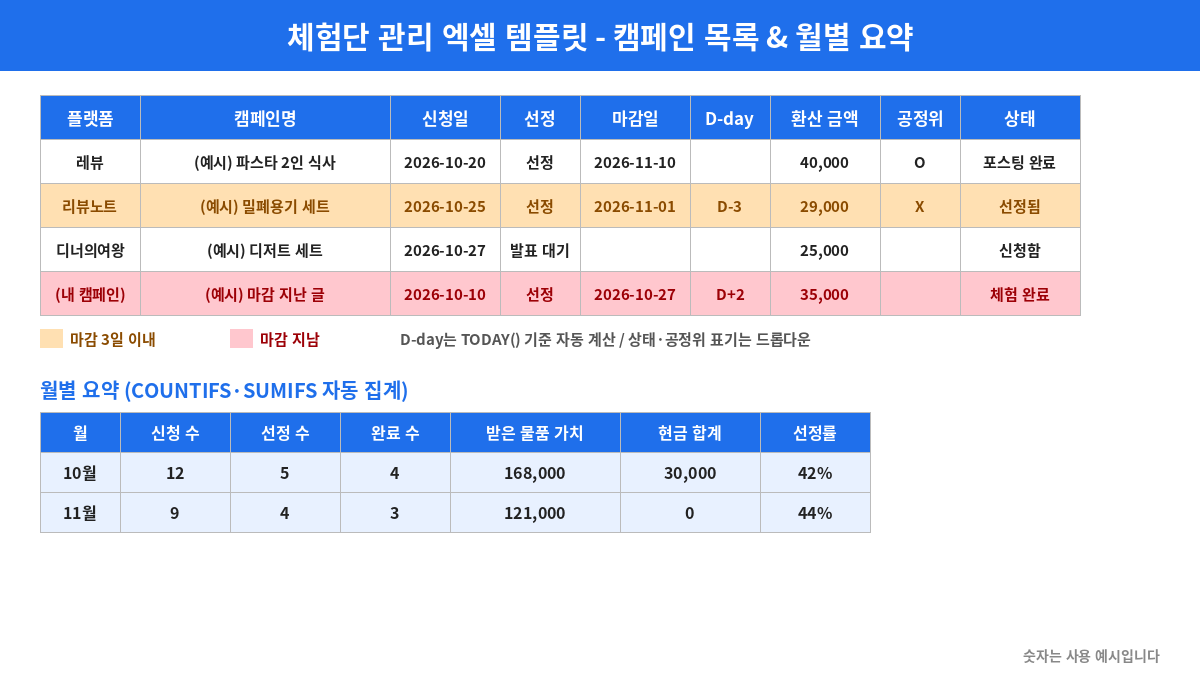
review-campaign-tracker-template-ko.xlsx, Korean labels) with 4 sheets - ① Campaign list: platform, campaign name, type, apply date, selected?, visit/receive date, posting deadline, D-day (auto), what you get, value (KRW), cash fee (KRW), post URL, FTC disclosure (O/X), status (dropdown), memo
- ② Monthly summary: applications, selections, completed posts, value of items received, cash total and selection rate for each month, calculated automatically
- ③ FTC disclosure examples: wording for blogs, Instagram and video, plus “not enough” examples
- ④ How to use: a 5-minute daily routine
- Color alerts: red = deadline passed, orange = 3 days or less, yellow = posted but disclosure marked X
- 3 gray example rows. They are left out of the monthly summary.
- Opens in Excel, Google Sheets, Hancell and LibreOffice.
New to review campaigns? Read How to Make Money with Blog Review Campaigns in Korea first.
Who it suits
- People who apply to 3 or more campaigns a month
- People who use 2 or more platforms such as Revu, Reviewnote or Dinner Queen
- People who have missed a deadline or forgot the sponsorship label
- People who want to know how much they received each month
Who it doesn’t suit
- People doing about 1 campaign a month (a calendar note is enough)
- People who find opening a spreadsheet stressful
Cost, time and earnings
- Cost: ₩0 (free Excel template)
- Time: 10 minutes to set up, then 5 minutes a day
- Earnings: the file itself doesn’t earn money. Items, meals and fees from campaigns vary by platform and campaign. The sheet helps you keep deadlines and records so you can keep going.
Rough range (estimate): keeping deadlines and completing 3–5 campaigns a month often adds up to about ₩50,000–₩200,000 worth of items and meals a month (estimate). Cash fees differ by campaign.
Rough estimate, not a guarantee. Results vary from person to person.
Want to compare many ways to make money side by side? See our.
Pros and cons
| Pros | Cons |
|---|---|
| Free, no install | You type entries yourself (no platform sync) |
| D-day and color alerts | Dates must use the set format |
| Monthly value, cash and selection rate calculated | Doesn’t calculate tax |
| Includes FTC disclosure examples | Check official sources for legal questions |
Step-by-step
Step 1. Prepare the file (10 min)
- Download it and rename it, e.g.
2026-review-campaigns.xlsx. - To use it on your phone, upload it to Google Drive and choose “Open with Google Sheets”.
- Look at the 3 gray example rows. Then clear their contents instead of deleting the rows, so the D-day formula stays.
- Check that the year cell (B2) on the monthly summary sheet is this year.
Step 2. When you apply (1 min)
- Enter platform, campaign name and type (visit / delivery / reporter).
- Write the apply date as 2026-11-03. The summary only works with this format.
- Set status to 신청함 (applied).
- Note what the campaign offers (e.g. a ₩30,000 meal voucher).
Step 3. When results come out (1 min)
- Pick 선정 (selected) or 미선정 (not selected).
- If selected, set status to 선정됨 and enter the posting deadline from the campaign page.
- D-day shows days left, like D-12. After the deadline it shows D+2.
- If not selected, set status to 미선정. D-day goes blank.
Step 4. On the visit/receive day (1 min)
- Enter the visit/receive date.
- Enter the offered value in value (KRW). If unknown, use the product’s normal price as a guide.
- Enter any cash fee separately.
- Set status to 체험 완료 (experienced).
Step 5. When you post (2 min)
- Make sure the title or first part has a clear sponsorship label. Copy wording from sheet ③ and adjust it.
- Paste the post URL.
- Mark the disclosure column O.
- Set status to 포스팅 완료 (posted). D-day and color clear.
- Register the URL on the platform too. Writing it only in the sheet doesn’t count as submitting.
If status is “posted” but disclosure isn’t O, the row turns yellow. Fix the label in your post.
Korea’s Fair Trade Commission guideline on endorsements says every post made in return for something (free products, meals, points, fees) must be clearly disclosed. On blogs, put it in the title or first part, larger or in a different color. Writing only “체험단” (review group) or hiding it in comments or “more” is not enough.
Step 6. 5-minute morning check
- Handle red (overdue) and orange (3 days or less) rows first.
- Use the filter button on the header row (row 4) to show only “selected” and “experienced” rows.
Step 7. Month-end check (5 min)
- Selection rate = selections ÷ applications. If low, improve your application text and blog topic.
- If completed is far below selections, you applied to too many. Apply less next month.
- Compare value + cash by platform to see which suits you.
Applications and selections count by apply date; completed, value and cash count by visit/receive date.
Tax note
Items, vouchers, points and fees may count as income in some cases. Ask the National Tax Service at 126 whether you need to report. This file is for record-keeping, not tax advice.
First-week plan
| Day | Task | Time |
|---|---|---|
| 1 | Prepare file, read example rows, check year | 10 min |
| 2 | Copy in all ongoing campaigns (with deadlines) | 15 min |
| 3 | Pick 2 disclosure phrases from sheet ③ and save them | 10 min |
| 4 | Apply to 2-3 new campaigns, log each right away | 5 min |
| 5 | Morning check: handle red/orange rows | 5 min |
| 6 | Fill in URLs and O/X, register URLs on platforms | 5 min |
| 7 | Review the summary and set next week’s application count | 5 min |
Common mistakes
- Writing dates like 11/3 → D-day and summary won’t calculate. Use 2026-11-03.
- Deleting example rows and losing formulas → clear contents only. If lost, copy a D-day cell from a row below.
- Not updating status → posted campaigns stay red. Switch to “posted”.
- Forgetting to register the URL on the platform → logging it is not submitting it.
- Labeling only “체험단” → not enough under the FTC guideline. Use something like “[협찬] Received for free”.
- Applying to too many at once → deadlines clash. Stop applying when you have more than 3 orange rows.
- Inflating values → it only ruins your own records.
Sources: Guideline on Endorsement and Testimonial Advertising (Korea Law Information Center, FTC Rule No. 499, effective 2026-06-01), Korea.kr policy briefing on blog review ads (2024-11-20) (checked October 2026). Tax questions: National Tax Service 126. This template is for record-keeping, not legal or tax advice.
Watch out for these scams
Some sellers push paid programs or courses with “guaranteed selection” or “this tool makes you money”. Others say you were selected and ask for shipping fees or a deposit first, or ask for your blog ID and password. Review campaigns usually don’t ask bloggers to pay first. Never share account details, and if something feels wrong, ask the platform’s official customer center.
Want to run a Review Campaign Tracker Template as a 30-day plan? The PDF guide (one-time .99) compares 30 methods with steps and income estimates. All steps above stay free.
See full guide →FAQ
Is How to Make Money with a Review Campaign Tracker Template: A Free Excel Sheet So You Never Miss a Deadline (2026) a legit way to make money?
Yes, it is legal and used worldwide. Korean blog review campaigns (체험단) get confusing once you apply to many. You forget where you applied, when winners are announced, and how many days are left before the posting deadline. Missing a deadline can hurt your chances next time. This review campaign tracker template counts the D-day automatically for each campaign and colors rows when a deadline is close. If you want to keep making money with review campaigns, start by keeping clean records. Results depend on your time, skills and consistency; never pay upfront fees to unknown "opportunities".
What are the main pros and cons of How to Make Money with a Review Campaign Tracker Template: A Free Excel Sheet So You Never Miss a Deadline (2026)?
Pros: One Excel file (review-campaign-tracker-template-ko.xlsx, Korean labels) with 4 sheets, ① Campaign list: platform, campaign name, type, apply date, selected?, visit/receive date, posting deadline, D-day (auto), what you get, value (KRW), cash fee (KRW), post URL, FTC disclosure (O/X), status (dropdown), memo, ② Monthly summary: applications, selections, completed posts, value of items received, cash total and selection rate for each month, calculated automatically, ③ FTC disclosure examples: wording for blogs, Instagram and video, plus "not enough" examples, ④ How to use: a 5-minute daily routine, Color alerts: red = deadline passed, orange = 3 days or less, yellow = posted but disclosure marked X, 3 gray example rows. They are left out of the monthly summary., Opens in Excel, Google Sheets, Hancell and LibreOffice.. Cons: People who apply to 3 or more campaigns a month, People who use 2 or more platforms such as Revu, Reviewnote or Dinner Queen, People who have missed a deadline or forgot the sponsorship label, People who want to know how much they received each month.
How do I start How to Make Money with a Review Campaign Tracker Template: A Free Excel Sheet So You Never Miss a Deadline (2026) step by step?
The full step-by-step guide is free to read on this page.
🎁 Free: 7-day side-hustle starter checklist
Leave your email and get the free checklist now. No spam, unsubscribe anytime.
Popular guides
- Top 10 Ways to Make Money Starting This Week (Free Checklist)
- How to Make Money as a Student: Legit Ideas (2026)
- Passive Income Ideas: Realistic Options for 2026
- Make Money Online Without Investment: 20 Free Ways
- How to Make Money with AI: 50 Practical Ways (2026)
- How to Make Money From Home: 20 Legit Ways
- Make Money Online for Beginners: 15 Easy Ways to Start
- How to Make Money as a Mom: 16 Flexible Ideas (Work Around Nap Time)
- 16 Legit Ways to Make Money Fast (This Week)
- How to Make Money as a Teenager: 16 Safe Ideas
- 14 Remote Jobs With No Experience Needed
Next method: How to Make Money with Naver Blog AdPost: From Sign-Up to Your First Payout (2026) →