Path
Contents
When you write on a Naver blog, ads can appear under your posts, and you get a share of the ad income. That service is Naver AdPost. This guide shows beginners how to start.
What is AdPost?
- A creator reward platform run by Naver. Your blog is used as ad space and you get a share of the income (AdPost policy).
- Eligible media: Naver Blog, Band, Influencer Search, Naver Clip.
- Joining is free.
Who is it for?
- People who already run a Naver blog, or can write regularly
- People with real experiences to share: cooking, parenting logs, local food spots, study notes
- People happy to build small income slowly
Not for: under-19s (sign-up can be refused) or people who rarely post.
Cost and time
- Cost: 0 KRW
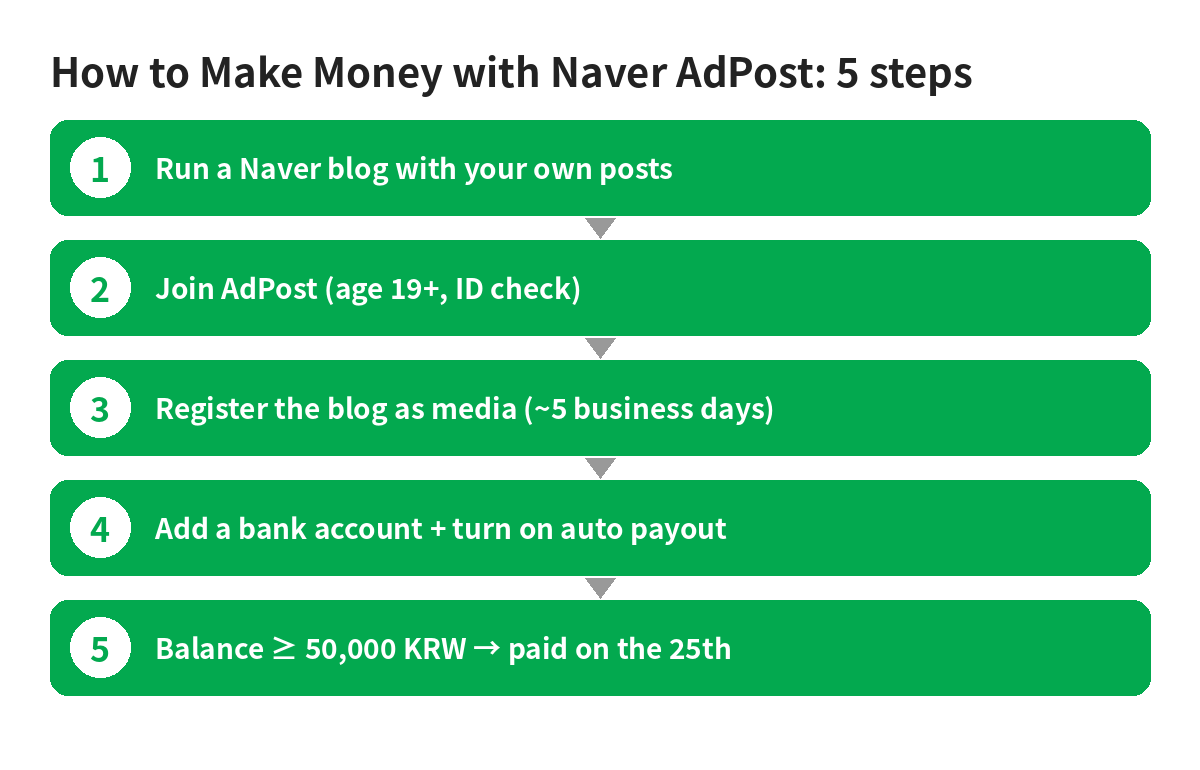
- Review: about 5 business days after media registration (Naver Help Center)
- First payout: on the 25th of the month after your balance reaches 50,000 KRW (policy 7.1)
How much can you earn? (estimate)
- First 1–3 months: about 0 to a few thousand KRW a month (estimate)
- 6+ months of steady posting with a few hundred daily visitors: roughly a few thousand to tens of thousands of KRW a month (estimate)
- Very high-traffic blogs: hundreds of thousands of KRW a month or more is possible but rare (estimate)
Rough estimates only, not a guarantee. Naver does not publish average earnings; income depends on visitors, topic and ad clicks. Results vary from person to person.
Want to compare many ways to make money side by side? See our.
Step by step
Step 1. Prepare your blog (1–2 weeks)
- Create a blog at Naver Blog.
- Pick one topic.
- Write from your own photos and experience. Never copy.
- Publish posts as public. Naver looks at the number of public posts and visitors (UV/PV) (policy 2.1).
There is no published official cutoff (number of posts or visitors). “50 posts is enough” is not an official rule.
Step 2. Join AdPost (10 min)
Log in at AdPost with your Naver ID, choose individual member if you are not a business, and finish the real-name check.
Step 3. Register your media (5 min + ~5 business days)
Click media registration, choose your blog and wait for the review. If it is on hold or rejected, add more posts and apply again.
Step 4. Set up payouts (10 min)
- Bank account: add an account in your own name and tick “pay my income automatically”. Savings-type accounts or name mismatches put payouts on hold (policy 7.1).
- Naver Pay money (individuals only): request a conversion; it arrives on the 12th of the next month.
Step 5. Taxes
- For individuals, once total payouts in a year pass 125,000 KRW, 8.8% (8% income tax + 0.8% local tax) is withheld, applied back to January (AdPost tax guide).
- Ask the National Tax Service (126) about your own case.
First-week plan
| Day | Task |
|---|---|
| 1 | Choose one topic; write blog name and intro |
| 2–6 | One post a day with 3+ of your own photos |
| 7 | Join AdPost, add a bank account, apply for media registration when you have enough posts |
Common mistakes
- Clicking your own ads or asking family to click: income can be clawed back and the account suspended (policy 6).
- Posts asking people to click ads, or rewarding clicks.
- More ads/promotions than your own content.
- Copying others’ photos or text.
- Zero valid clicks for 2 months.
Sources: AdPost policy, Getting started, Tax guide (checked Oct 2026). General information, not tax advice.
Watch out for these scams
Ads offering “AdPost approval service”, “more visitors” or “blogs for sale” are common. Paid fake traffic can get your ads blocked or your income taken back. Bought blogs can be suspended. Never share your Naver password. AdPost has no sign-up fee.
Want to run Naver Blog AdPost as a 30-day plan? The PDF guide (one-time .99) compares 30 methods with steps and income estimates. All steps above stay free.
See full guide →FAQ
Is How to Make Money with Naver Blog AdPost: From Sign-Up to Your First Payout (2026) a legit way to make money?
Yes, it is legal and used worldwide. When you write on a Naver blog, ads can appear under your posts, and you get a share of the ad income. That service is Naver AdPost. This guide shows beginners how to start. Results depend on your time, skills and consistency; never pay upfront fees to unknown "opportunities".
What are the main pros and cons of How to Make Money with Naver Blog AdPost: From Sign-Up to Your First Payout (2026)?
Pros: A creator reward platform run by Naver. Your blog is used as ad space and you get a share of the income (AdPost policy)., Eligible media: Naver Blog, Band, Influencer Search, Naver Clip., Joining is free.. Cons: People who already run a Naver blog, or can write regularly, People with real experiences to share: cooking, parenting logs, local food spots, study notes, People happy to build small income slowly.
How do I start How to Make Money with Naver Blog AdPost: From Sign-Up to Your First Payout (2026) step by step?
The full step-by-step guide is free to read on this page.
🎁 Free: 7-day side-hustle starter checklist
Leave your email and get the free checklist now. No spam, unsubscribe anytime.
Popular guides
- Top 10 Ways to Make Money Starting This Week (Free Checklist)
- How to Make Money as a Student: Legit Ideas (2026)
- Passive Income Ideas: Realistic Options for 2026
- Make Money Online Without Investment: 20 Free Ways
- How to Make Money with AI: 50 Practical Ways (2026)
- How to Make Money From Home: 20 Legit Ways
- Make Money Online for Beginners: 15 Easy Ways to Start
- How to Make Money as a Mom: 16 Flexible Ideas (Work Around Nap Time)
- 16 Legit Ways to Make Money Fast (This Week)
- How to Make Money as a Teenager: 16 Safe Ideas
- 14 Remote Jobs With No Experience Needed
Next method: How to Make Money with Kaggle Competition Prizes: A Beginner Roadmap and What Winners Must Submit (2026) →