Path
Contents
Vertex42 says its free Excel Gantt template has “Over 3 million downloads” (Vertex42). Gantt Excel shows 8,960,000+ downloads on its home page (Gantt Excel). One free Korean template on Bizforms has 30,522 views (Bizforms).
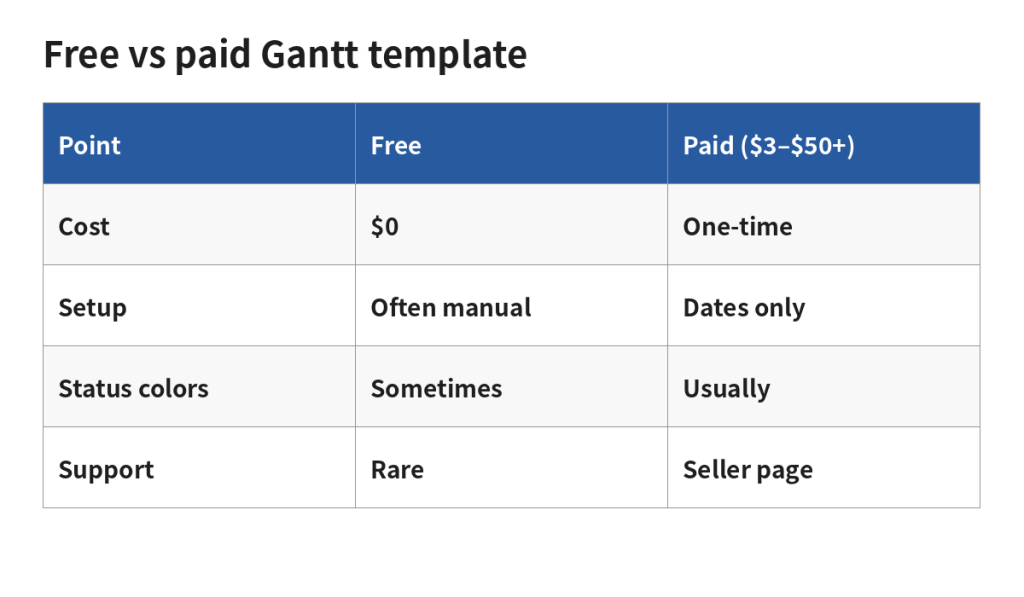
So free templates are everywhere. Why would anyone pay? This guide compares both in plain words, so you can pick in a few minutes.
1. What Excel gives you for free
Excel has no built-in “Gantt” chart type. Microsoft’s own guide tells you to build a stacked bar chart, then hide the first bar series and fix the axis by hand (Microsoft Support). It works, but when the start date moves, you fix the axis again.
2. Three real examples
- Example 1 – Free and popular: Vertex42’s free Gantt template has over 3 million downloads. The page also notes a Pro version “uses a design very similar to this free version” (source). Free can be enough.
- Example 2 – Full tool: Gantt Excel (8,960,000+ downloads) is a bigger tool with many features (source). More power, more to learn.
- Example 3 – Where it goes wrong: The chart method in Microsoft’s guide needs manual axis and color steps (source). If your dates change every week, this is where many people give up and go back to a plain list.
3. Cost table
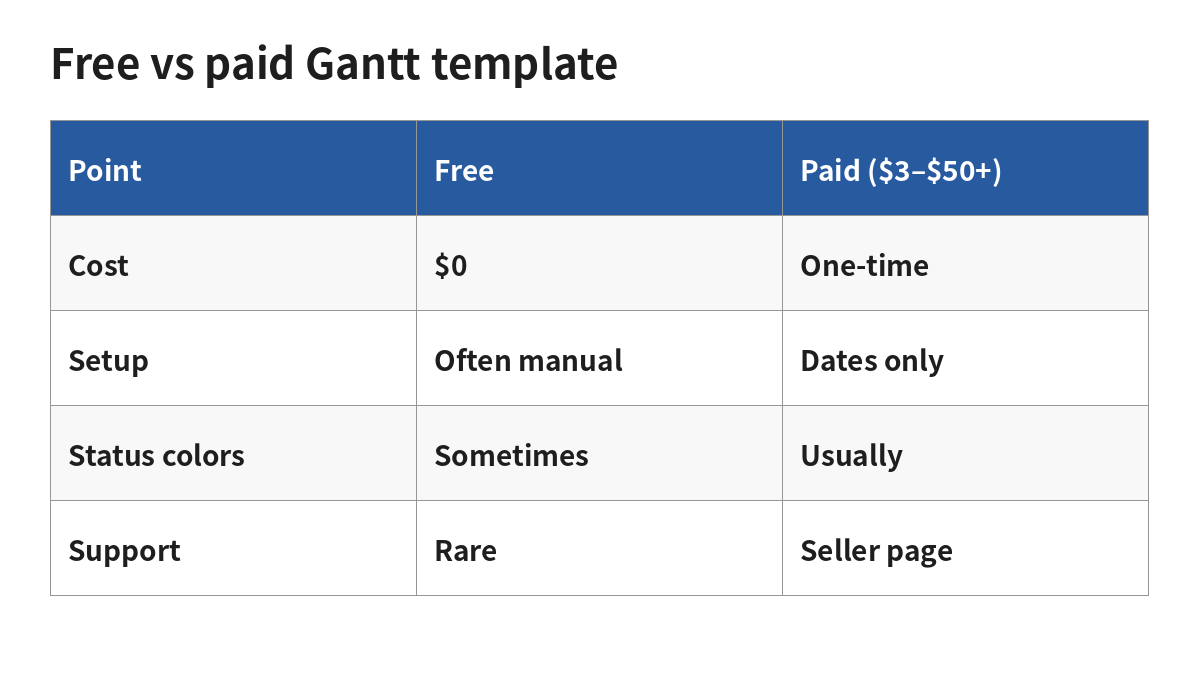
| Option | Money | What you still do yourself |
|---|---|---|
| Build from scratch | $0 | Formulas, colors, axis |
| Free template | $0 | Often colors / status rules |
| Small paid template | about $3–$5 one-time | Type dates |
| Full Gantt add-in or app | higher, check seller | Learn the tool |
Paid prices above come from seller pages; they change often, so check before you buy.
Want to test the idea before downloading anything? Try the free online Gantt tool first (no sign-up; the screen is in Korean).
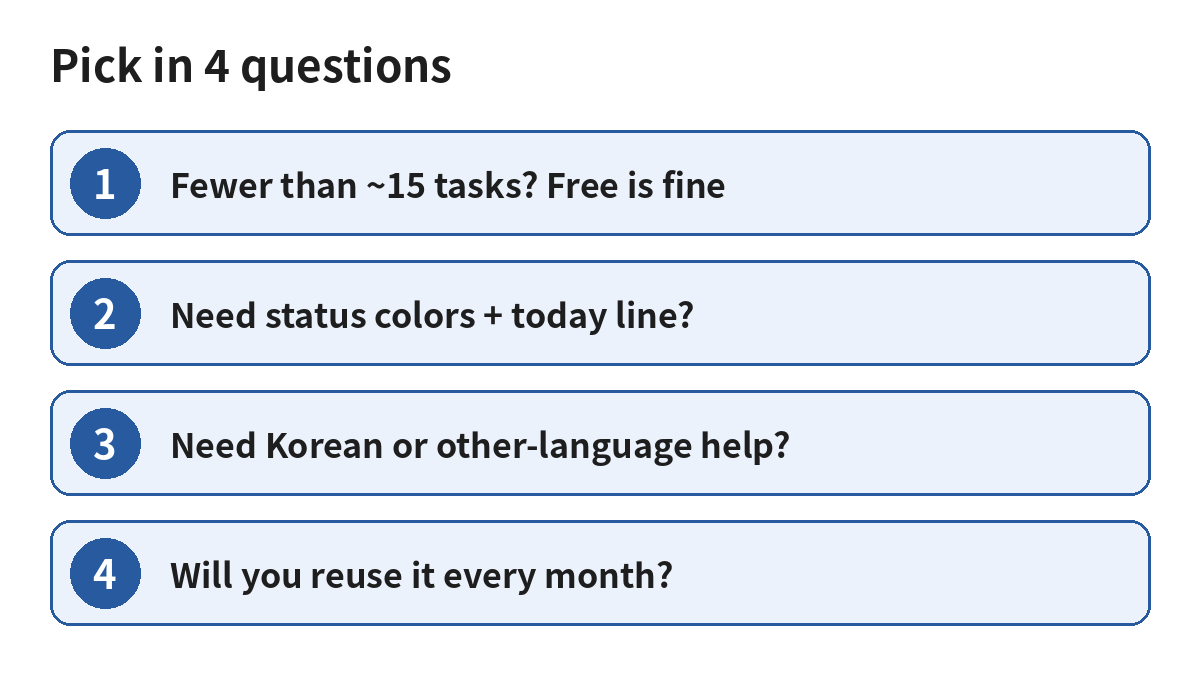
4. Pick in four questions
- Fewer than about 15 tasks? A free template is fine.
- Want status colors and a “this week” line without setup? A small paid one saves time.
- Need help in another language (for example Korean)? Check the instructions sheet.
- Reuse it every month? Then setup time matters more than a few dollars.
📦 A small paid option: Project Schedule (Gantt Chart) Excel Template
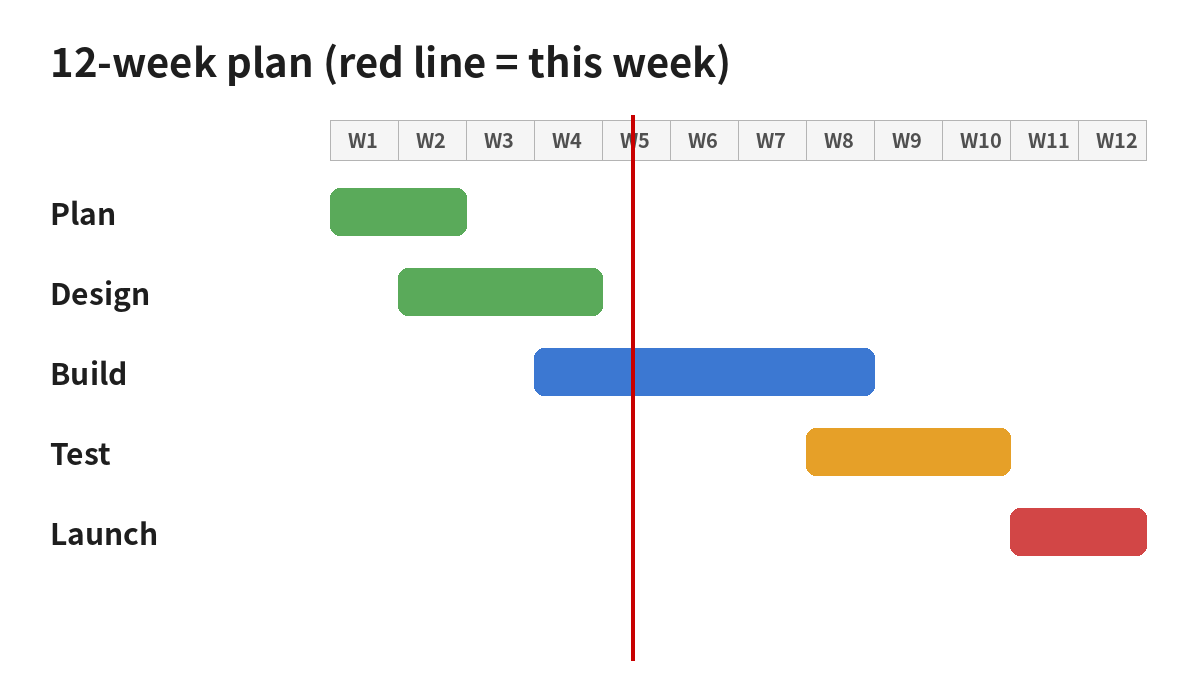
- Type the project start date and each task’s start and end dates; 12-week bars draw themselves.
- Auto duration, progress %, a status dropdown (not started, in progress, done, on hold, late) with a color for each, and a this-week marker.
- One .xlsx file with 3 sheets: how-to, Gantt, example. Blank template holds 30 rows and 12 weeks. Labels and how-to are in Korean.
- Works in Excel and Google Sheets.
- Price: $4.49. No reviews yet.
5. Related reads
Bottom line
Start free. If you keep fixing colors and axes by hand, a small ready-made file like the 12-week Gantt template may be worth it.
Sources
- Vertex42: https://www.vertex42.com/ExcelTemplates/excel-gantt-chart.html
- Gantt Excel: https://www.ganttexcel.com/
- Bizforms (30,522 views): https://www.bizforms.co.kr/form/excel/accounting/30000611
- Microsoft Support: https://support.microsoft.com/en-us/office/present-your-data-in-a-gantt-chart-in-excel-f8910ab4-ceda-4521-8207-f0fb34d9e2b6
FAQ
Is Free or Paid Gantt Template? Try Free First, Upgrade Only If You Need Auto-Colored Bars a legit way to make money?
Yes, it is legal and used worldwide. Vertex42 says its free Excel Gantt template has "Over 3 million downloads" (Vertex42). Gantt Excel shows 8,960,000+ downloads on its home page (Gantt Excel). One free Korean template on Bizforms has 30,522 views (Bizforms). Results depend on your time, skills and consistency; never pay upfront fees to unknown "opportunities".
What are the main pros and cons of Free or Paid Gantt Template? Try Free First, Upgrade Only If You Need Auto-Colored Bars?
Pros: Example 1 – Free and popular: Vertex42's free Gantt template has over 3 million downloads. The page also notes a Pro version "uses a design very similar to this free version" (source). Free can be enough., Example 2 – Full tool: Gantt Excel (8,960,000+ downloads) is a bigger tool with many features (source). More power, more to learn., Example 3 – Where it goes wrong: The chart method in Microsoft's guide needs manual axis and color steps (source). If your dates change every week, this is where many people give up and go back to a plain list.. Cons: Type the project start date and each task's start and end dates; 12-week bars draw themselves., Auto duration, progress %, a status dropdown (not started, in progress, done, on hold, late) with a color for each, and a this-week marker., One .xlsx file with 3 sheets: how-to, Gantt, example. Blank template holds 30 rows and 12 weeks. Labels and how-to are in Korean., Works in Excel and Google Sheets., Price: $4.49. No reviews yet..
How do I start Free or Paid Gantt Template? Try Free First, Upgrade Only If You Need Auto-Colored Bars step by step?
The full step-by-step guide is free to read on this page.
🎁 Free: 7-day starter checklist for earning extra income
Leave your email and get the free checklist now. No spam, unsubscribe anytime.
Popular guides
- Top 10 Ways to Make Money Starting This Week (Free Checklist)
- Passive Income Ideas: Realistic Options for 2026
- Make Money Online Without Investment: 20 Free Ways
- How to Make Money with AI: 50 Practical Ways (2026)
- How to Make Money From Home: 20 Legit Ways
- Make Money Online for Beginners: 15 Easy Ways to Start
- 16 Legit Ways to Make Money Fast (This Week)
- How to Make Money as a Teenager: 16 Safe Ideas
- 14 Remote Jobs With No Experience Needed
Next method: How to Make Money: A 5-Point Checklist to Compare Methods Before You Start (2026) →