Path
At a glance
Contents
Written on 2026-10-26 after checking official Toss pages (Help Center FAQ, Tossfeed, service page). Benefits can change without notice, so re-check the in-app notices. Amounts are small and nothing here promises income. Screenshots show Korean-language public pages.
The Benefits (혜택) tab in the Toss app collects small point rewards: walking, quizzes, scratchcards and more.
Everything here was checked against official Toss pages (Help Center FAQ, Tossfeed, service page).
To be upfront: the amounts are small. In Toss’s own 2024 review, pedometer users collected about KRW 2,900 on average over the year, and “Turn on Toss Together” users about KRW 3,400 each. Think of it as spare-change points, not income.
Who this suits
- People who already use Toss
- People who walk every day (pedometer)
- People who don’t mind opening the app for 1–2 minutes a day
- People who often pay online with Toss Pay
Not for you if you expect meaningful money for your time, or you dislike watching ads.
At a glance: current vs. changed
| Feature | Status (checked 2026-10-26) | Reward |
|---|---|---|
| Pedometer (만보기) | Running | Random points at step goals; scratchcard at 10,000 steps |
| Lucky Lottery (행운복권) | Running, some users only (14+) | Random points |
| Lucky Quiz (행운퀴즈) | Running (14+) | Random points, ends when prize budget runs out |
| Turn on Toss Together (함께 토스 켜고 포인트 받기) | Running | Points when other Toss users nearby have the app on |
| Raise a Cat (고양이 키우고 간식 받기) | Running | e-coupons (e.g. coffee) when the cat is grown |
| Explore / reward alerts / fortune / live shopping / voting | Running | KRW 10-level points |
| Everyday benefits (Toss Pay discounts/coupons) | Changes monthly | Discounts, only when you pay |
| Old pedometer “visit missions” | Ended (Oct 2023 revamp) | — |
| “Free withdrawal over 5,000P” | Ended (now a 10% fee) | — |
Toss states the Lucky Lottery “may change or end without prior notice.” Other features can change too, so always re-check the in-app notice.
Step by step
Step 1. Find the Benefits tab and your points
📝 Logged-in screen (text description)
Tap [혜택] (Benefits) in the bottom menu. At the very top you’ll see ⓟ N원 — your Toss Points balance. Tap it for history and the [출금] (Withdraw) button.
- 1 point = KRW 1, up to 2,000,000 points, valid 5 years from the date earned.
- Points vanish immediately if you delete your account and don’t come back on rejoining.
Step 2. Turn on the pedometer
📝 Logged-in screen (text description)
In Benefits, tap 만보기 (Pedometer). You’ll see today’s steps and 5 goal points: 10 → 4,000 → 6,000 → 9,000 → 10,000 steps. When you reach one, you must tap the reward button yourself.
- Steps and unclaimed rewards reset at midnight (Korea time). Claim before bed.
- At 10,000 steps you get a scratchcard. Toss’s official page says prizes range from KRW 1 up to KRW 1 million. Realistically, most are a few won.
- A short ad plays before you scratch.
- Smartwatch steps are not counted (iPhone and Android).
Step 3. If steps don’t go up (official FAQ fix)
iPhone
1. Update Toss to the latest version
2. Settings → Battery → turn off Low Power Mode
3. Switch between mobile data and Wi-Fi
4. Restart the phone at least 3 times, then check
Android
1. Check Toss is the latest version
2. Settings → Apps → Toss → Battery → Unrestricted
3. Settings → Apps → Toss → Mobile data → turn on Allow background data
4. Restart at least 3 times, then check
Toss says iPhone 4/4S/5/5C can’t really use the pedometer.
Step 4. Optional 1–2 minute daily routine
📝 Logged-in screen (text description)
The Benefits list shows items like these. The list can differ per person.
- Explore recommendations: KRW 10 per tap, up to twice a day; with the evening surprise mission, KRW 25 total (official page).
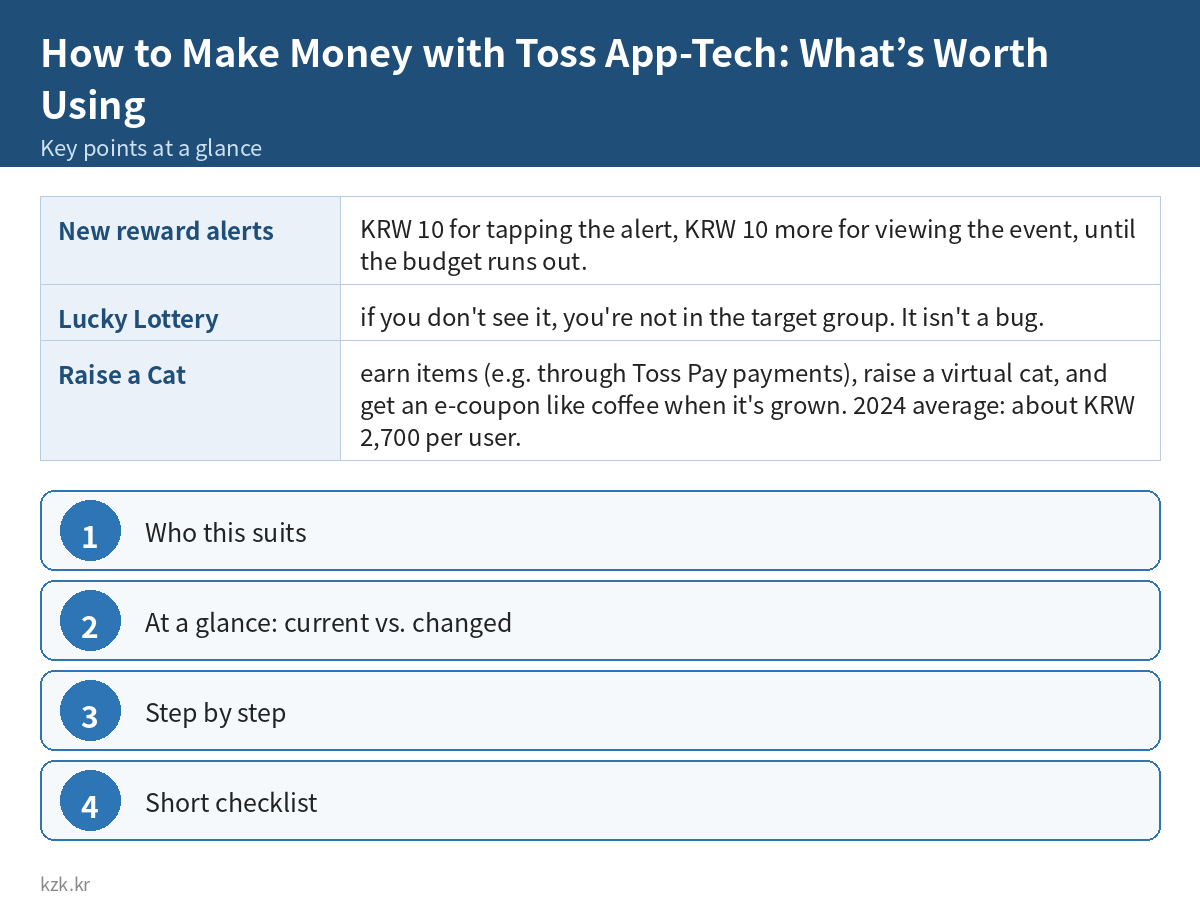
- New reward alerts: KRW 10 for tapping the alert, KRW 10 more for viewing the event, until the budget runs out.
- Lucky Quiz: answer a partner brand’s question for random points; [힌트보기] shows a hint on the partner’s page.
- Fortune, voting, live shopping: random points for joining.
- Lucky Lottery: if you don’t see it, you’re not in the target group. It isn’t a bug.
Step 5. Turn on Toss Together / Raise a Cat
- Turn on Toss Together: you earn points when other people near you have Toss open. (It may need Bluetooth; the app’s permission notice lists “Bluetooth: identify and connect to nearby devices.”)
- Raise a Cat: earn items (e.g. through Toss Pay payments), raise a virtual cat, and get an e-coupon like coffee when it’s grown. 2024 average: about KRW 2,700 per user.
- Invite a friend: if both are 19+, each gets 1,000 points; the inviter can earn up to 20 times. People who ever signed up for Toss before usually can’t join.
⚠️ The cat grows faster when you pay. Don’t make purchases you don’t need just for points.
Step 6. Everyday benefits (Toss Pay discounts)
Tossfeed posts a monthly “Toss Pay benefits roundup.” In October 2026 it listed coupons for delivery, duty-free, food, electronics and home brands.
– Some coupons must be claimed in the app first.
– Check minimum spend, dates and payment method.
– Only worth it for things you were going to buy anyway.
Step 7. Using and withdrawing points
- Spend: online Toss Pay payments and brand gift coupons. No fee when used for Toss Pay.
- Withdraw: Benefits → ⓟ N원 → Withdraw. From 100 points, to your “main account.”
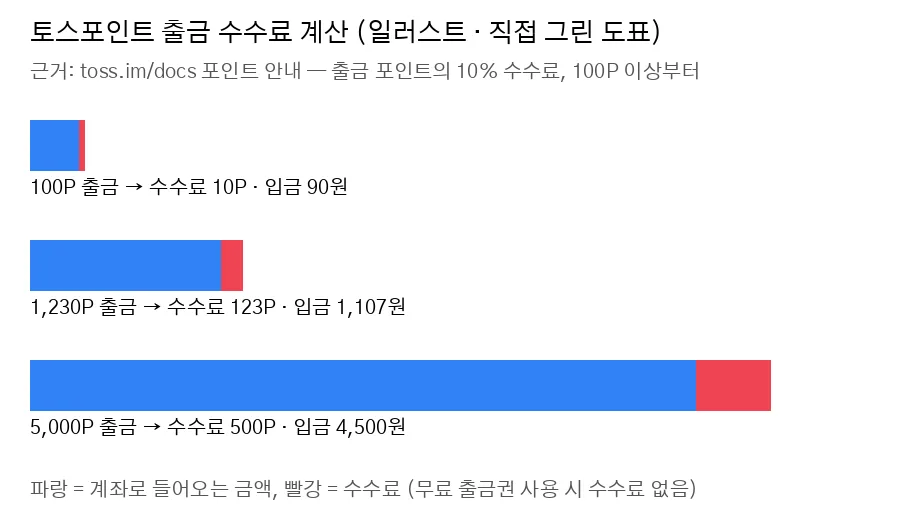
- Each withdrawal costs 10% of the amount (e.g. 1,230P → 123P fee).
- Toss Prime members and Toss Mobile / Toss-sold carrier plan users get one free withdrawal voucher a month.
This chart is an illustration I drew from the official 10% rule. It is not an app screen.
Tip: for small balances, spending via Toss Pay loses nothing.
Common mistakes
- Not tapping rewards before midnight → that day’s rewards are gone.
- Leaving battery saver on → steps don’t count.
- Reinstalling because Lucky Lottery is missing → it’s for some users only.
- Withdrawing small amounts often → 10% each time.
- Paying for things you don’t need for cat items or coupons → you spend more than you get.
- Trusting old blog posts → “visit missions” and “free withdrawal over 5,000P” are gone.
- Gaming the system → Toss says it can take back points and restrict the app.
Short checklist
- ☐ I know where the ⓟ balance is in Benefits
- ☐ I allowed the motion/fitness (physical activity) permission
- ☐ Toss is excluded from battery optimization
- ☐ I claim pedometer rewards before bed
- ☐ I withdraw in one batch, or spend via Toss Pay
- ☐ I don’t buy things just for points

You can search the Toss Help Center (support.toss.im) FAQ for more.
To compare other reward and cashback apps, see Cashback and rewards apps.
If you’d like more calm, practical guides like this, take a look at our premium content.
👉 kzk.kr Premium
FAQ
Is How to Make Money with Toss App-Tech: What’s Worth Using a legit way to make money?
Yes, it is legal and used worldwide. Written on 2026-10-26 after checking official Toss pages (Help Center FAQ, Tossfeed, service page). Benefits can change without notice, so re-check the in-app notices. Amounts are small and nothing here promises income. Screenshots show Korean-language public pages. Results depend on your time, skills and consistency; never pay upfront fees to unknown "opportunities".
What are the main pros and cons of How to Make Money with Toss App-Tech: What’s Worth Using?
Pros: People who already use Toss, People who walk every day (pedometer), People who don't mind opening the app for 1–2 minutes a day, People who often pay online with Toss Pay. Cons: 1 point = KRW 1, up to 2,000,000 points, valid 5 years from the date earned., Points vanish immediately if you delete your account and don't come back on rejoining..
How do I start How to Make Money with Toss App-Tech: What’s Worth Using step by step?
The full step-by-step guide is free to read on this page.
🎁 Free: 7-day side-hustle starter checklist
Leave your email and get the free checklist now. No spam, unsubscribe anytime.
Popular guides
- Top 10 Ways to Make Money Starting This Week (Free Checklist)
- How to Make Money as a Student: Legit Ideas (2026)
- Passive Income Ideas: Realistic Options for 2026
- Make Money Online Without Investment: 20 Free Ways
- How to Make Money with AI: 50 Practical Ways (2026)
- How to Make Money From Home: 20 Legit Ways
- Make Money Online for Beginners: 15 Easy Ways to Start
- How to Make Money as a Mom: 16 Flexible Ideas (Work Around Nap Time)
- 16 Legit Ways to Make Money Fast (This Week)
- How to Make Money as a Teenager: 16 Safe Ideas
- 14 Remote Jobs With No Experience Needed
Next method: How to Make Money Selling on Danggeun Market: Photos That Sell →